As the title says the issue exactly..
Happened while using “Solve Cloudflare Turnstile Captcha” block
I’m willing to share my CaptchaAI API in a trusted hand privately to help resolve the issue asap; expecting dear @Ruri the savior 
As the title says the issue exactly..
Happened while using “Solve Cloudflare Turnstile Captcha” block
I’m willing to share my CaptchaAI API in a trusted hand privately to help resolve the issue asap; expecting dear @Ruri the savior
Did you follow this?
The Captcha API may have changed.
Fill in the required fields and try this:
I made guesses about the variable names and keys.
Since there is no API Key, the variable names and keys in LoliCode may be different; you can fix this.
BLOCK:ConstantString
LABEL:YOUR_API_KEY
  => VAR @YOUR_API_KEY
ENDBLOCK

BLOCK:ConstantString
LABEL:SITE_KEY
  => VAR @SITE_KEY
ENDBLOCK

BLOCK:ConstantString
LABEL:PAGE_URL
  => VAR @PAGE_URL
ENDBLOCK

BLOCK:HttpRequest
  url = $"https://ocr.captchaai.com/in.php?key=<YOUR_API_KEY>&method=turnstile&sitekey=<SITE_KEY>&pageurl=<PAGE_URL>&json=1"
  TYPE:STANDARD
  $""
  "application/x-www-form-urlencoded"
ENDBLOCK

BLOCK:Keycheck
  KEYCHAIN RETRY OR
    STRINGKEY @data.SOURCE Contains "status\":0"
  KEYCHAIN SUCCESS OR
    STRINGKEY @data.SOURCE Contains "status\":1"
ENDBLOCK

BLOCK:Parse
  input = @data.SOURCE
  jToken = "task_id"
  MODE:Json
  => VAR @task_id
ENDBLOCK
bool solved = false;
int timeout = 30000; // 30 sn
int elapsed = 0;

WHILE INTKEY @elapsed LessThan @timeout
BLOCK:Delay
  milliseconds = 1000
ENDBLOCK

BLOCK:HttpRequest
  url = $"https://ocr.captchaai.com/res.php?key=<YOUR_API_KEY>&action=get&id=<task_id>&json=1"
  TYPE:STANDARD
  $""
  "application/x-www-form-urlencoded"
ENDBLOCK
IF STRINGKEY @data.SOURCE Contains "\"status\":\"failed\""
    data.STATUS = "RETRY";
    return;
END

IF STRINGKEY @data.SOURCE Contains "\"status\":\"ready\"" AND @data.SOURCE DoesNotContain "\"token\":\"\""
    solved = true;
    break;
END

elapsed = elapsed + 1000;

END

IF BOOLKEY @solved IsNot True
    data.STATUS = "RETRY";
    return;
END
BLOCK:Parse
  input = @data.SOURCE
  jToken = "token"
  MODE:Json
  => VAR @parseOutput
ENDBLOCK
Already tried that out before posting the issue here; but it didn’t come in handy. Later I opened up a ticket there, and they got me with a solution very similar to the one @YoucefxD suggested.
Thanks man, although I’ve got the same solution from the help ticket at CaptchaAI, but your script helped me arranging the repeat loop to check the status in a time interval 
Have you been able to reach a solution?
If you want, send me the API key and I’ll create the full configuration.
Then you can change the API key.
Well, I’m having trouble with the solution you suggested; sometimes the output still shows “captcha_required” even though the input is submitted along with the solved token. The annoying part is, I’ve tried sending the request to CaptchaAI along with the proxy and proxytype while activating the routing through the sent proxy in CaptchaAI config, but still getting the error sometimes 
Yes, this isn’t your fault or the configuration’s fault. Because the token that the captcha solves and sends you was obtained through automation.
I think Cloudflare detects that it’s automated.
That’s why it gives the “captcha required” response.
Or there’s a mistake in your configuration.
What is the site?
I do believe there’s no mistake in my config since that error doesnt return all the time; If I don’t use proxy at all, I get the result as expected; so I believe the problem lies in the proxies, and I probably know why. My proxies are back connected rotating proxies, so there should be a mismatch between what proxy the OB 2 sends to CaptchaAI and what proxy actually is being used underhood. Anyway, I actually can’t use the direct proxies either, yes I do have a list of bunch of paid proxies, but all those got banned from my targeted website for life. I wish I could get 2.5k to 3k quality proxies that actually are not raped or banned within $50-60 or may be less
Is it necessary to use proxies connecting to the captcha AI?
I think is necessary, otherwise CF might detect the token generated automatically; with proxies the bots get less failure than without proxies!
Well, i use also a turnstile solver, so just talking based on my experience, i send the requests to the solver pless and once i get the response, i turn on the proxies and i never had problems.
May be use some delay also.
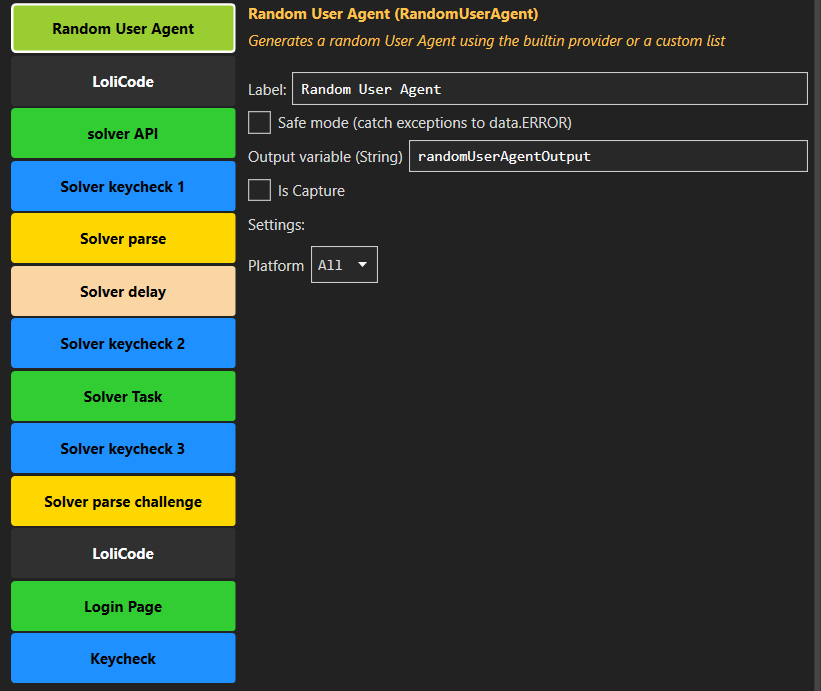
Just uploading a screenshot, how i use my config with my turnstile solver.
lucky you trying the site doesn’t have other hindrance, while mine one is absolute 
I was using captcha ai for turnstile is not working is wasting time.
I was using local solver from GitHub free working perfect very fast and no need proxies using my ip,the only problem I have cannot use high bots only 1 to 4 and you need powerful pc to use high bots. Not all site need proxies.
can you give me the local solver’s github link pls? your feedback worths a try