hello I have a scrpit running on node.je however I would like to use it on openbullet can someone help me
Please speak English otherwise we cannot help you
hello I have a scrpit running on node.js however I would like to use it on openbullet can someone help me
hello I have a scrpit running on node.je however I would like to use it on openbullet can someone help me
Are you using openbullet 1 or 2? Because on OB2 this is really easy, there’s a block specifically for node.js interoperability, on OB1 it’s more complex (you need the shell plugin).
I have open 1 and 2 but I’m a layman in open bullet
would you have some explanatory text or could you help me please
In OB2 add a Script block, then change the interpreter to NodeJS and finally paste your code inside. If you need npm packages you have to go to the Scripts folder (inside the OB2 root folder) and do
npm init
and install your packages in there.
Then run the script block and it will correctly work.
Check out this guide to learn more
thanks very mutch

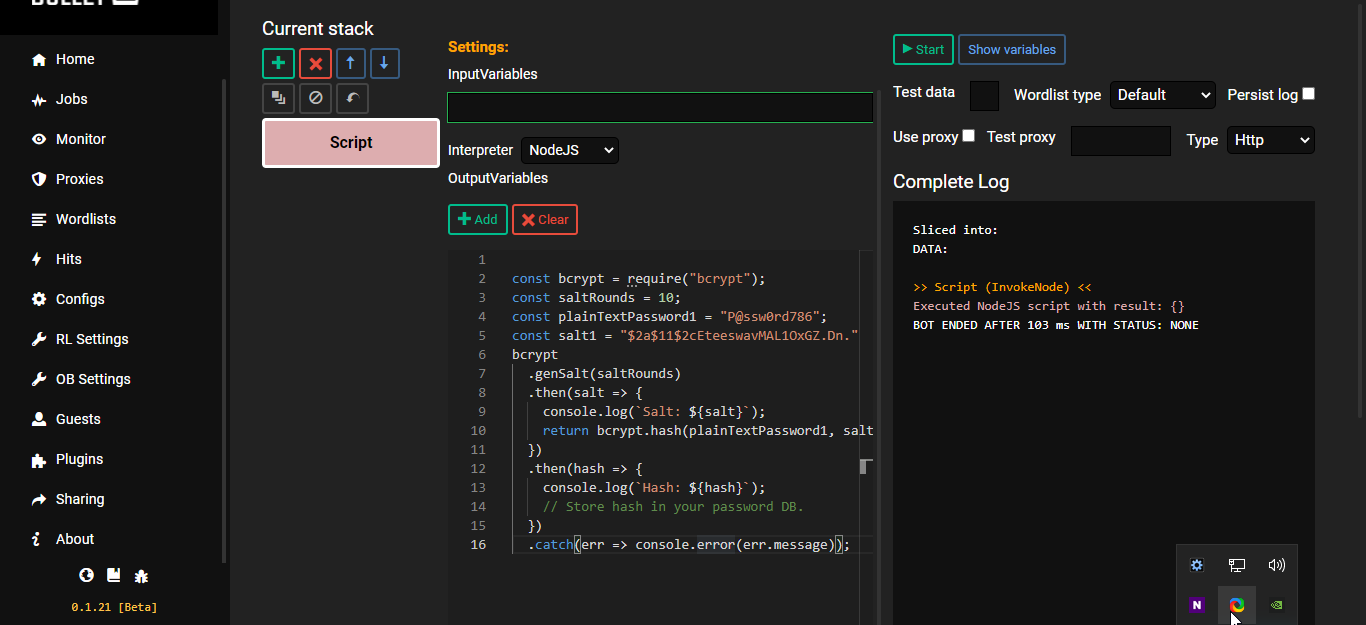
You need to set those variables in a global scope (instead of logging to console, just assign them to some variables you declared outside of those functions). And then simply add 2 string output variables with the same names you chose inside the script and voilà you now have them available in blocks too.
Can you write the codes I am not good with JavaScript and not much familiar with OB2 yet
Take it as an opportunity to learn some js. It’s not hard, trust me.
1 Like
Alright mate will try my best If I am unable to solve it will come back
1 Like
Help XD cant figure out on myself
Paste the code here in triple backticks please so I don’t have to copy it manually
1 Like
const bcrypt = require("bcrypt");
const saltRounds = 10;
const plainTextPassword1 = "P@ssw0rd786";
const salt1 = "$2a$11$2cEteeswavMAL1OxGZ.Dn."
bcrypt
  .genSalt(saltRounds)
  .then(salt => {
    console.log(`Salt: ${salt}`);
    return bcrypt.hash(plainTextPassword1, salt1);
  })
  .then(hash => {
    console.log(`Hash: ${hash}`);

    // Store hash in your password DB.
  })
  .catch(err => console.error(err.message));
const bcrypt = require("bcrypt");
const saltRounds = 10;
const plainTextPassword1 = "P@ssw0rd786";
const salt1 = "$2a$11$2cEteeswavMAL1OxGZ.Dn."
bcrypt
  .genSalt(saltRounds)
  .then(salt => {
    console.log(`Salt: ${salt}`);
    return bcrypt.hash(plainTextPassword1, salt1);
  })
  .then(hash => {
    console.log(`Hash: ${hash}`);

    // Store hash in your password DB.
  })
  .catch(err => console.error(err.message));
var finalSalt = "";
var finalHash = "";

const bcrypt = require("bcrypt");
const saltRounds = 10;
const plainTextPassword1 = "P@ssw0rd786";
const salt1 = "$2a$11$2cEteeswavMAL1OxGZ.Dn."
bcrypt
  .genSalt(saltRounds)
  .then(salt => {
    finalSalt = salt;
    return bcrypt.hash(plainTextPassword1, salt1);
  })
  .then(hash => {
    finalHash = hash;
  })
  .catch(err => console.error(err.message));
And then add two output variables in the script block, make their type String (not Int or something else) and call them finalSalt and finalHash. Hope it’s clear now… If it doesn’t work try using this.finalSalt and this.finalHash inside the script where I do the assignment (not where the variables are declared at the top).


Hmm okay try with this, should work
const bcrypt = require("bcrypt");
const saltRounds = 10;
const plainTextPassword1 = "P@ssw0rd786";
const salt1 = "$2a$11$2cEteeswavMAL1OxGZ.Dn."

var finalSalt = bcrypt.genSalt(saltRounds);
var finalHash = bcrypt.hash(plainTextPassword1, salt1);
1 Like