Hi! I’d like to introduce my extension for solving ReCAPTCHA V2 / Enterprise / Invisible.
It’s somewhat similar to google.crx from this thread “Bypass Recapcha V2 & V3 (Ulimited Resolve using AI)”
Key differences:
Pros:
Well-trained neural networks. 3×3 grids are solved almost perfectly, 4×4 grids nearly perfectly
Very low CPU usage (almost no load at all)
Can be installed from the store or as a local folder, not just via .crx
Can be used to build your own anti-captcha / 2captcha-like solution
Supports both Chrome and Firefox
Cons:
Slightly larger size (~76 MB)
Does not support hCaptcha
The extension automatically clicks the captcha, selects the correct images, and presses “Verify”. It works using a built-in neural network. No API keys, no registration, and no payments are required. One downside is that it collects a dataset on my server from encountered images, but this can be disabled in the settings.
Your own anti-captcha / 2captcha solution:
Since the extension cannot directly accept requests from external programs, you need to register on the extension’s website, generate an API key there, and insert it into the extension. You also need to use the version downloaded from the website (not the store version).
After that, you can send captchas to the website using your API key (compatible with anti-captcha or 2captcha API formats). The website forwards them to your extension.
The extension opens a page, solves the captcha, and returns the token back to the website, where you can retrieve it. The browser can stay minimized and won’t bother you (it will only open once on the first captcha). You can run as many browser instances as you want.
May I ask this? How is reCAPTCHA solved on sites that don’t support IPv6 proxy? http://www.botmasterlabs.net/
For example, this site’s program. premiumize.me doesn’t support IPv6, but I send an IPv6 proxy to the program
and the program solves it and gives a token.
Ultimately, without a domain, reCAPTCHA doesn’t give a token.
You’re obviously referring to services like anti-captcha/2captcha. You send them the reCAPTCHA site key, a proxy, and the page URL, and they return a reCAPTCHA token.
They don’t actually open the target page itself - instead, they open a local page on their side with the reCAPTCHA widget embedded and a spoofed address bar, so that reCAPTCHA “thinks” it’s being loaded on the correct domain.
Hey, i made a template for visible reCAPTCHA v2 using this extension.
I just created the account, so i cant upload files yet. ill send the lolicode instead.
I hope this helps! If you need any help, send me your tg @ and ill message you there.
And thanks to Raptor for creating and sharing the extension! =)
BLOCK:ConstantString
LABEL:API KEY
  value = "API_KEY_HERE"
  => VAR @apikey
ENDBLOCK

BLOCK:ConstantString
LABEL:SITE KEY
  value = "SITE_KEY_HERE"
  => VAR @sitekey
ENDBLOCK

BLOCK:ConstantString
LABEL:WEBSITE URL
  value = "WEBSITE_URL_HERE"
  => VAR @web
ENDBLOCK

data.UseProxy = false;

BLOCK:HttpRequest
  url = "https://captchaplugin.com/createTask.php"
  method = POST
  TYPE:STANDARD
  $"{\"clientKey\": \"<apikey>\",\"task\": {\"type\": \"RecaptchaV2TaskProxyless\",\"websiteURL\": \"<web>\",\"websiteKey\": \"<sitekey>\"}}"
  "application/json"
ENDBLOCK

BLOCK:Keycheck
  banIfNoMatch = False
  KEYCHAIN FILL_ALL_FIELDS OR
    STRINGKEY @data.SOURCE Contains "ERROR_BAD_REQUEST"
ENDBLOCK

BLOCK:Parse
  input = @data.SOURCE
  leftDelim = "\"taskId\":"
  rightDelim = "}"
  MODE:LR
  => VAR @TaskID
ENDBLOCK

BLOCK:Delay
  milliseconds = 4000
ENDBLOCK

BLOCK:HttpRequest
  url = "https://captchaplugin.com/getTaskResult.php"
  method = POST
  TYPE:STANDARD
  $"{\"clientKey\": \"<apikey>\",\"taskId\": <TaskID>}"
  "application/json"
ENDBLOCK
WHILE STRINGKEY @data.SOURCE Contains "processing"
BLOCK:Delay
  milliseconds = 2000
ENDBLOCK

BLOCK:HttpRequest
  url = "https://captchaplugin.com/getTaskResult.php"
  method = POST
  TYPE:STANDARD
  $"{\"clientKey\": \"<apikey>\",\"taskId\": <TaskID>}"
  "application/json"
ENDBLOCK
IF STRINGKEY @data.SOURCE Contains "ERROR_CAPTCHA_UNSOLVABLE"
break;
END
END
data.UseProxy = true;
BLOCK:Keycheck
  banIfNoMatch = False
  KEYCHAIN SUCCESS OR
    STRINGKEY @data.SOURCE Contains "\"errorId\":0"
ENDBLOCK

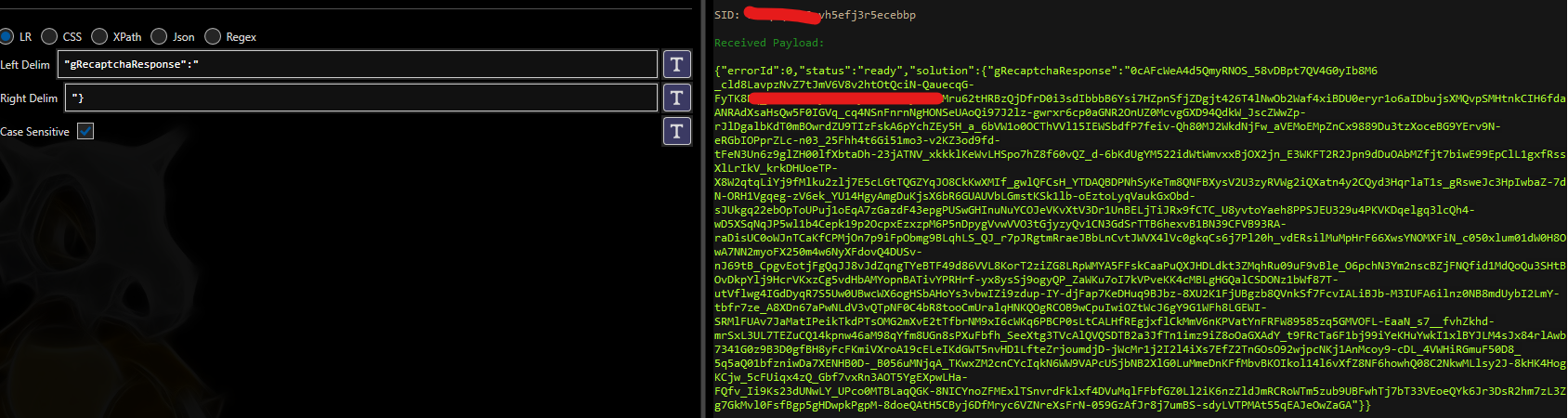
BLOCK:Parse
  input = @data.SOURCE
  leftDelim = "\"gRecaptchaResponse\":\""
  rightDelim = "\"}"
  MODE:LR
  => VAR @Solution
ENDBLOCK